Why Your Browser May Be Masking Its Identity — Chrome’s Dominance Shapes the Web
Introduction
When you visit a major website using Firefox or Safari, the browser might secretly change how it identifies itself—or even how it renders the page. This isn't a nefarious conspiracy between browser makers and big tech companies. Rather, it's a practical response to Chrome's overwhelming market dominance. As Chrome rolls out new features, website developers rush to support them, often inadvertently breaking compatibility with other browsers. To ensure users don't encounter broken pages, Firefox and Safari adapt—sometimes by pretending to be Chrome.
The Mechanics Behind Browser Adaptation
User-Agent Spoofing and Feature Detection
Every browser sends a User-Agent string to websites, announcing its identity and capabilities. When a site detects a non-Chrome browser, it might serve a different—often degraded—version of the page. To counter this, Firefox and Safari can override their User-Agent to mimic Chrome. Additionally, they may alter how they interpret certain CSS or JavaScript features to match Chrome's behavior, even if those features technically work differently in their own engines.
Why Browsers Resort to 'Lying'
The Blame Game: Chrome's Feature Rollouts
Google frequently introduces new web capabilities exclusively for Chrome. Developers, eager to use the latest tools, implement them without testing in other browsers. When other browsers later support the same feature, websites may fail to detect it correctly—or rely on a Chrome-specific quirk. Rather than display a broken site, Firefox and Safari choose to fake Chrome's behavior.
The Cost of Breaking the Web
If a browser refused to adapt, millions of users would encounter broken layouts, missing functionality, or error messages. The user experience would suffer, driving people away. Thus, browsers prioritize pragmatism over purity, adding compatibility layers that mask their true identity.
How Firefox and Safari Handle Compatibility
Firefox's about:compat Tool
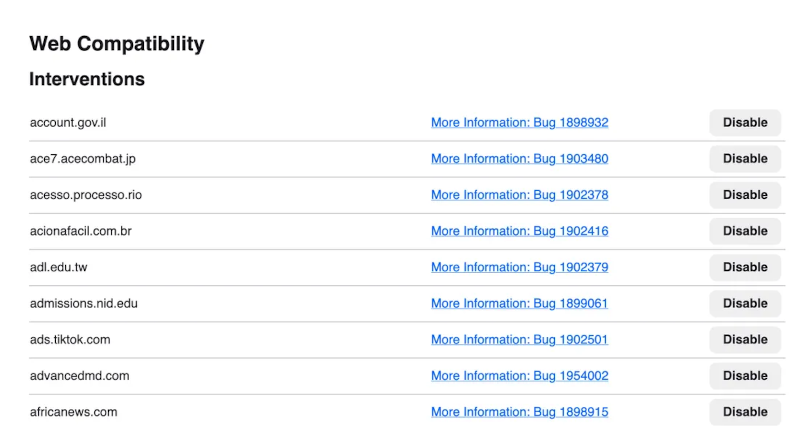
Firefox provides a built-in page at about:compat where users can see which sites are being adjusted and even disable individual fixes. This transparency lets power users understand exactly what changes are made. The list includes domains where Firefox applies a fake User-Agent or other workarounds.
Safari's Quirks File
Safari stores its compatibility overrides in a file aptly named quirks. This file contains a list of sites and the specific modifications needed to render them correctly. Unlike Firefox, there is no user-accessible interface; you must dig into system files to examine the rules.
Tracking Fixes on Bugzilla
For those interested in the fine details, the Mozilla Bugzilla database tracks every compatibility fix applied to Firefox. You can search for bug numbers or keywords to see discussions about why a particular site required a change, and how the fix was implemented.
The Bigger Picture: Browser Engines and Web Standards
Modern browsers are incredibly complex, yet they rely on only a handful of rendering engines: Blink (used by Chrome, Edge, Opera), Gecko (Firefox), and WebKit (Safari). The situation highlights a worrying trend: the web's direction is increasingly determined by whichever company dominates the market. The question is no longer whether a single entity should control web standards, but which entity currently does.
Conclusion
The so-called "lying" by browsers is a pragmatic survival strategy. As long as Chrome commands the majority of users, other browsers must adapt or risk irrelevance. While this ensures a smoother experience for end-users, it also concentrates power over the web's evolution into the hands of one corporation. Understanding this dynamic is the first step toward advocating for a more standards-based, browser-agnostic future.
Related Articles
- Revolutionizing Frontend Testing: Vue Components Now Testable Directly in Browser Without Node.js
- Copilot Studio Gains Performance and Ease with .NET 10 on WebAssembly
- JavaScript Module Systems: A Comprehensive Guide to CJS and ESM
- YouTube RAM Bug Q&A: Why Your Browser Is Freezing and How to Fix It
- GCC 16.1 Brings C++20 Default, Experimental C++26 Support, and More
- Block Protocol Progress Revives Semantic Web Promise After Two Decades of Stalled Adoption
- Music Streaming Wars: Apple Music Loyalists Defect to YouTube Music as Bundling Strategy Gains Ground
- Mastering Native CSS Randomness: A Complete Guide to Dynamic Styles